
.jpg?quality=95)

iMDAS and BAP - digital Lithuanian Customs declaration procedure
What does this mean for exporters and importers working with Lithuania?
If your company relies on a representative to handle customs procedures – such as a logistics company, customs broker or freight forwarder – it is necessary to officially delegate the authority to represent your company in customs matters. This authorisation is issued through the Lithuanian Customs BAP portal.
Without this delegation, submitting customs declarations is no longer possible through a representative, even if they previously managed this for you. This update has been effective since 1 October 2025.
Steps to assign delegation
1. Log in to the BAP portal and grant administrator rights
A company employee must log in to the Lithuanian Customs BAP portal: https://bap.lrmuitine.lt and authenticate through the Electronic Government Gateway.
Authentication may fail if your employees are operating outside Lithuania. In this case, the first step is to submit an application to the Customs of the Republic of Lithuania to register as a service recipient. Instructions can be found here: Unauthenticated user registration - BAP. Once certified, you will be able to log in to the BAP portal.
After logging in, you will first need to grant administrator rights to an employee or yourself (if you are the manager) so that you can assign the delegation to the desired representative (customs broker). Without administrator rights, this action will not be possible.
2. Create the delegation agreement
Agreement must have:
- Company details
- Representative and company EORI code (our company – ColliCare Logistics UAB, LT304079350 EORI);
- Agreement number and validity period (it is recommended to set the validity period to as long as possible to avoid interruptions in the declaration process)
- The rights granted to the representative (it is recommended to check all the boxes related to exports to avoid restrictions on declarations). Be sure to select the following rights (activity profiles) that you are delegating to us to perform:
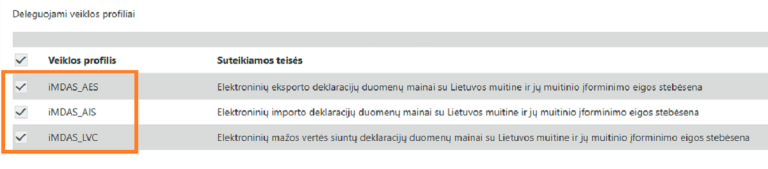
Confirm the data and submit the agreement to the system.
3. Our company will confirm the delegation, and only then will it take effect.
You can find the BAP user guide with all the necessary steps clearly outlined for you.
Our customs team

Radvilė Juozulevičienė
Import Customs Broker
Lina Zeikė
Import Customs Broker
Dovilė Mockutė
Customs Broker